

Download Kingshiper Image Compressor – Free, Secure, Batch Image Compression Tool for Windows, Mac, Android & iOS
Kingshiper Image Compressor is a powerful, privacy-first software designed to compress images, videos, documents, and audio files with exceptional efficiency. Whether you're a photographer, content creator, or everyday user managing digital files, this tool simplifies file size reduction without sacrificing quality. With support for over 15 formats including JPG, PNG, BMP, MP4, AVI, Docx, PPTX, and MP3, Kingshiper delivers high compression ratios—up to 10x—while preserving visual and audio fidelity.
All processing happens locally on your device, ensuring your sensitive files never leave your system. This makes it one of the most secure file compression tools available today. Ideal for cloud storage optimization, email attachments, website uploads, and social media sharing, Kingshiper Image Compressor is a must-have utility for modern digital workflows.
Download the free version today and experience seamless, fast, and safe file compression across Windows, Mac, Android, and iOS platforms.
Key Features of Kingshiper Image Compressor
Kingshiper Image Compressor stands out in the crowded field of file compression tools thanks to its comprehensive feature set and user-centric design. One of its most impressive features is the ability to compress multiple files in a single batch, saving valuable time for users managing large volumes of images or documents. Whether you're preparing a portfolio, optimizing a website, or sending a folder of media via email, batch processing ensures efficiency without compromise. The software supports a wide range of file formats, including popular image types like JPG, PNG, and BMP, as well as video formats such as MP4, AVI, and FLV. Document formats like Doc, Docx, PPT, PPTX, XLS, and XLSX are also fully compatible, making it a one-stop solution for digital file management.
Another standout feature is the local processing engine. Unlike many online compressors that upload your files to remote servers, Kingshiper performs all compression tasks directly on your device. This guarantees complete privacy and data security, which is essential for professionals handling sensitive or confidential content.
The compression algorithm is smartly optimized to deliver up to 10x file size reduction while maintaining high visual and audio quality—perfect for preserving detail in photos and videos. Additionally, the interface is clean and intuitive, allowing both beginners and advanced users to navigate effortlessly. You can adjust compression levels manually or use the auto-optimized mode for quick results.
With no need for internet access and minimal system requirements, Kingshiper Image Compressor is a lightweight yet powerful tool that enhances productivity across devices.
How to Install and Use Kingshiper Image Compressor
Installing Kingshiper Image Compressor is a straightforward process, whether you're using Windows, Mac, Android, or iOS. Begin by downloading the appropriate version from the official website. For Windows and Mac users, the installer is a small, self-contained executable that runs smoothly on systems running Windows 7 or later and macOS 10.12 or higher. After downloading, simply double-click the file and follow the on-screen prompts. The setup wizard is quick and requires no advanced configuration—just a few clicks to complete installation.
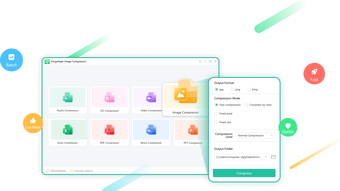
Once installed, launch the application to access the main interface. To compress files, simply drag and drop your images, videos, documents, or audio files into the workspace. Alternatively, use the "Add Files" button to browse and select your desired files.
The software automatically detects the file types and prepares them for compression. You can choose between preset compression levels—Low, Medium, High, or Custom—or let the app auto-optimize based on file type and size. For advanced users, the Custom mode allows fine-tuning of quality, resolution, and output format.
After setting your preferences, click the "Compress" button. The process runs in the background, and a progress bar keeps you informed. Once complete, the compressed files are saved to your chosen folder, ready for use.
The tool also supports exporting with a custom naming convention, which is helpful when organizing large batches.
For mobile users, the Android and iOS versions offer a touch-friendly interface. Download the app from the Google Play Store or Apple App Store, and enjoy the same core functionality on the go. The mobile version supports image and video compression, making it ideal for optimizing photos before posting on social media or reducing file size for instant messaging apps.
The app works offline, so no data is transmitted, ensuring your privacy remains intact. Regular updates are pushed through the app stores, bringing new features and performance improvements. Overall, Kingshiper Image Compressor offers a seamless experience across all platforms, making file compression accessible and hassle-free.
Compatibility and System Requirements
Kingshiper Image Compressor is built with cross-platform compatibility in mind, ensuring that users across different devices can benefit from its powerful compression capabilities. The software is officially available for Windows, Mac, Android, and iOS, making it one of the most versatile tools in its category. For Windows users, the application supports Windows 7 and later versions, including Windows 10 and Windows 11. It runs efficiently on both 32-bit and 64-bit systems with minimal impact on performance. Mac users can install the app on macOS 10.12 (Sierra) or newer, including the latest Apple Silicon (M1/M2) chips, ensuring smooth operation on modern MacBooks and iMacs.
Mobile users will appreciate the native Android and iOS apps, which are optimized for smartphones and tablets. The Android version requires Android 6.0 (Marshmallow) or higher, while the iOS version is compatible with devices running iOS 12 or later. Both mobile apps are lightweight and consume minimal storage space, making them ideal for users with limited device capacity. Despite the platform differences, the core functionality remains consistent: local processing, batch compression, and support for multiple file types. The software is designed to work offline, so you don’t need an internet connection to use it—perfect for travelers or users in low-connectivity areas.
System requirements are modest, ensuring broad accessibility. On desktop platforms, Kingshiper Image Compressor requires at least 500 MB of free disk space and 1 GB of RAM. It doesn’t rely on heavy graphics processing, so even older or budget machines can run it without lag.
The mobile versions are optimized for touch interaction and battery efficiency, so you can compress files without draining your device’s power. With regular updates that improve stability and add new features, Kingshiper ensures long-term usability across all supported devices. Whether you're working from a desktop, laptop, tablet, or smartphone, this tool adapts seamlessly to your workflow.
Pros and Cons of Kingshiper Image Compressor
- Pros:
- Supports batch compression for multiple files at once
- Local processing ensures maximum privacy and security
- Up to 10x compression ratio without significant quality loss
- Wide format support: JPG, PNG, BMP, MP4, AVI, Docx, PPTX, MP3, and more
- Free version available with no time limits (though with watermarks)
- Intuitive, clean interface suitable for beginners and pros
- Available on Windows, Mac, Android, and iOS
- Offline functionality with no internet required
- Cons:
- Free version adds watermarks to output files
- Advanced features like custom presets and metadata removal require a paid upgrade
- Limited file size limit in free version (up to 50 MB per file)
- No built-in cloud sync or sharing integration
- Mobile app lacks some desktop-level customization options
Frequently Asked Questions (FAQ)
-
Is Kingshiper Image Compressor free to download and use?
Yes, Kingshiper Image Compressor offers a free version that allows you to download and use the software without any cost. However, the free version includes watermarks on compressed files and limits file size to 50 MB. For watermark-free exports and access to advanced features, a paid subscription is required.
-
Does Kingshiper compress files online or locally?
All compression processes happen locally on your device. Kingshiper does not upload your files to any remote server, ensuring complete privacy and security. This makes it ideal for handling sensitive or confidential files.
-
Which file formats does Kingshiper support?
Kingshiper supports a wide range of formats: images (JPG, PNG, BMP), videos (MP4, AVI, FLV), documents (Doc, Docx, PPT, PPTX, XLS, XLSX), and audio files (MP3, WAV, OGG). This versatility makes it suitable for various digital workflows.
-
Can I use Kingshiper on my smartphone?
Yes, Kingshiper offers native apps for both Android and iOS. These mobile versions support image and video compression and work offline, making them perfect for on-the-go file optimization.
-
How do I remove watermarks from compressed files?
To remove watermarks, you need to upgrade to the premium version of Kingshiper Image Compressor. The paid plan unlocks watermark-free exports, higher file size limits, and advanced compression settings.
Conclusion: Why You Should Download Kingshiper Image Compressor Today
Kingshiper Image Compressor is a top-tier, privacy-focused tool that delivers exceptional performance across multiple platforms. Its ability to compress images, videos, documents, and audio files with up to 10x reduction—without compromising quality—makes it a game-changer for anyone managing digital content. The local processing ensures your files stay secure, while the batch compression feature saves time and effort. Whether you're a photographer reducing image sizes for web use, a student optimizing presentation files, or a remote worker sending large attachments via email, this tool streamlines your workflow.
Although the free version includes watermarks and file size restrictions, the core functionality is robust and fully functional. For professionals and power users, the premium upgrade unlocks full potential. With support for Windows, Mac, Android, and iOS, Kingshiper offers unmatched accessibility. If you're looking for a reliable, secure, and efficient way to compress files, Kingshiper Image Compressor is the ideal choice. Download the free version today and experience fast, safe, and smart file compression on any device.







